
Artifacts
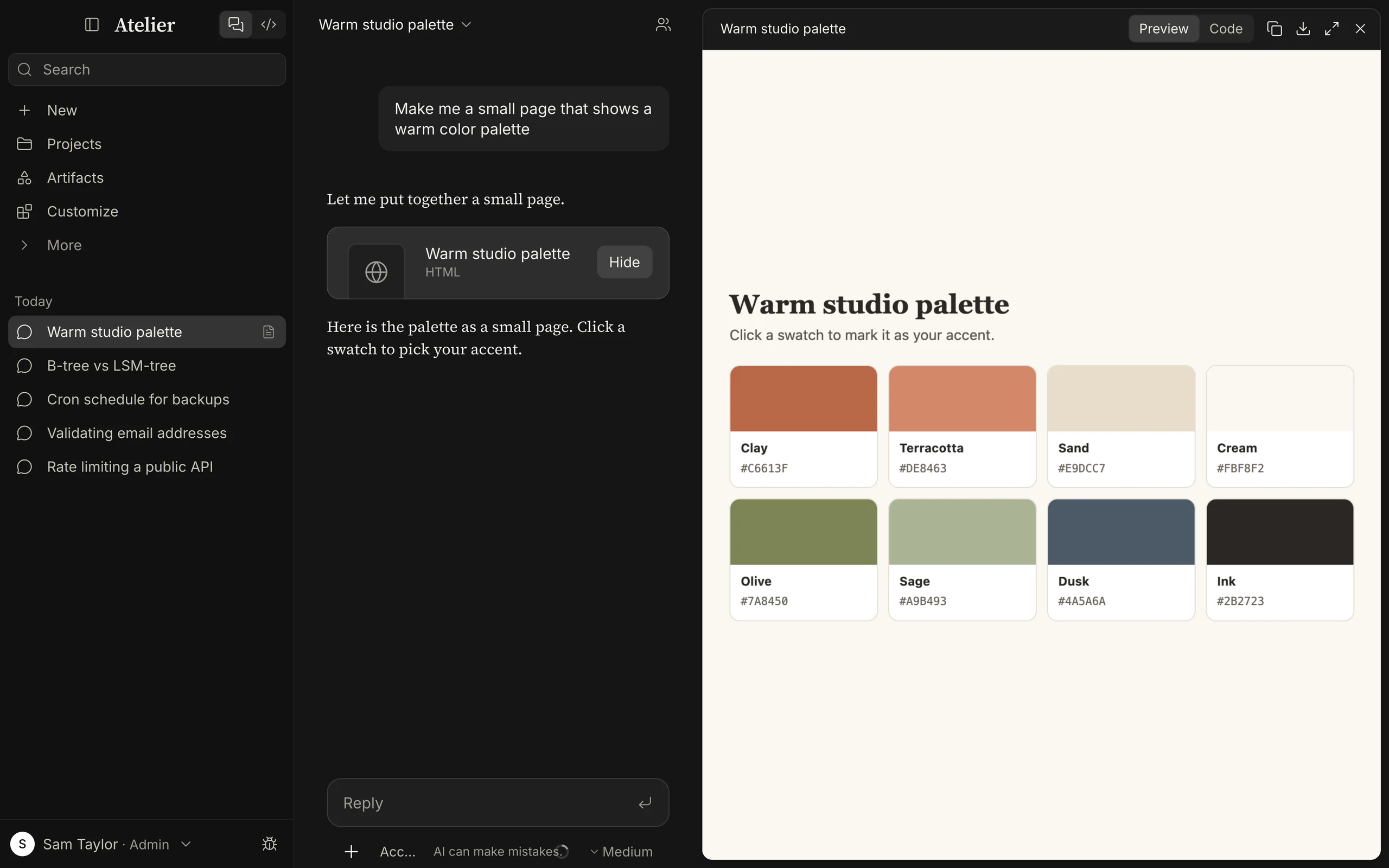
An artifact is a standalone piece of content the model builds for you to keep, look at, and keep working on: a web page, a small app, a chart, a diagram, a document, a program. It sits in a panel beside the conversation, runs on its own, has a version for every change, and can be copied or downloaded.
| Type | Shown as | Notes |
|---|---|---|
| HTML | A page, running | A complete page with its own CSS and JavaScript. Downloads as .html. |
| React | A component, running | One default-exported component with no required props, styled with Tailwind utility classes. It can import only react, react-dom, lucide-react and recharts. Downloads as .jsx. |
| SVG | An image | Scaled to fit. Downloads as .svg. |
| Diagram | A Mermaid diagram | Any Mermaid diagram, in the app’s theme. Downloads as .mmd. |
| Document | Rendered Markdown | Prose, tables, code. Downloads as .md. |
| Code | Source only | Any language; it has a Code view and no preview. Downloads with the language’s extension (.py, .ts, .rs …), or .txt when unknown. |
The list is the one the artifact tool accepts (see the tool reference).
Asking for one
Section titled “Asking for one”The model decides when something is an artifact. It makes one for substantial standalone output you will keep, edit or use elsewhere: complete programs or components, web pages and interactive tools, SVG graphics, longer documents (more than about 20 lines of code or a page of text), long creative pieces, and any request that names a file format or asks for an artifact. Short code, explanations, outlines, lists, tables and a single recipe stay in the reply. If you ask for a “report” without a format, it asks once whether you want it in the reply or as a document.
What helps:
- Say “as an artifact” or name the thing. “Build a unit converter as a single HTML page” or “make a sequence diagram of the sign-in flow”.
- Describe what it should do, not how it is built. The model chooses the type. Ask for React when you want charts (Recharts) or a component you can reuse elsewhere.
- Keep it self-contained. The sandbox has no network, so there are no CDN scripts, web fonts, remote images,
fetchcalls or form posts. Ask for inline data, inline SVG anddata:images instead. - Iterate on the same one. “Make the header smaller and add a dark mode” changes the open artifact and adds a version.
- One at a time. A reply makes a single artifact unless you ask for several.
- If the preview shows an error, a banner at the top of the panel gives the message (“… is not available in artifacts. Available: react, react-dom, …” for a disallowed import, a script error, a Mermaid syntax error). The model cannot see the preview, so paste the message back to it. A card that reads Failed means the tool call was refused (for example, the content was too large).
The card and the panel
Section titled “The card and the panel”A card in the reply shows the artifact’s title, its type and, once there is more than one version, the version (“HTML · v3”). It reads Writing… while the model is still writing. Click Open (or the card) to show the artifact in the panel beside the conversation, Hide to close it. In a window narrower than 768 px the panel covers the conversation.
The panel’s header, left to right:
| Control | What it does |
|---|
| ‹ v2/3 › | Previous version and Next version. Shown when there is more than one version. |
| Preview / Code | Switches between the running artifact and its source. Absent for Code artifacts. |
| Copy content | Copies the source of the version you are looking at. |
| Download | Saves the version you are looking at as <identifier>.<extension>. |
| Full width / Exit full width | Widens the panel across the conversation area (not in narrow windows). |
The panel takes 62% of the main area; a /btw side chat closes it to make room.
Versions
Section titled “Versions”Every create is version 1 and every update or rewrite adds one; nothing is overwritten. The panel follows the
latest version as the model writes it. Step back with Previous version and that version stays on screen until
you step forward again. Versions are kept with the conversation. The title and the type can change from one version to
the next.
An artifact belongs to its conversation and is deleted with it. A temporary chat deletes its artifacts when you leave it, and they never appear on the Artifacts page.
The Artifacts page
Section titled “The Artifacts page”Artifacts in the Chat sidebar lists everything your conversations built, most recently updated first, 60 at a time (Show more loads the next 60). Chips filter by type: All, HTML, React, SVG, Diagram, Document and Code. Each tile shows the type, the version count (“· 3 versions”) when there is more than one, the title, and the conversation it came from with when it changed. Clicking a tile opens that conversation with the artifact open.
Inline visuals
Section titled “Inline visuals”An inline visual is the small cousin of an artifact. The model draws it right in the reply when seeing or interacting helps you understand something: a diagram you can play with, a chart you can change inputs on, a quick prototype.
| Artifact | Inline visual | |
|---|---|---|
| Where | A panel beside the conversation | In the conversation |
| For | Something to keep, edit and reuse | Something to understand or try |
| Versions | Yes, every change | No; a new visual is a new one |
| Listed on the Artifacts page | Yes | No |
| Types | HTML, React, SVG, Diagram, Document, Code | An HTML fragment with CSS and script |
| Size limit | 500,000 characters | 100,000 characters (title 120, description 1,000) |
| Available in | Chat; Code (shows a file) | Chat |
| Controls | Copy, Download, versions | Reset visual, Download as HTML, Expand visual (fullscreen) |
Every inline visual has a plain-language description, which is what a screen reader reads. If one fails to draw, the conversation shows an error line with Try again.
How they are sandboxed
Section titled “How they are sandboxed”Everything an artifact or an inline visual runs is untrusted code that a model wrote, so it is boxed in.
The frame. The preview is an <iframe sandbox="allow-scripts">, and never allow-same-origin, so the page inside
has an opaque origin. It loads Atelier’s small runtime page (from
/artifact-runtime/ on a server, from a private atelier-artifact: address in the desktop app) and the runtime
receives the content over postMessage. The only messages Atelier listens to from an artifact’s frame are “ready”, “rendered” and
“error”, and an error is only displayed as text.
The policy. The runtime page is served with this Content-Security-Policy, which the browser enforces on the artifact:
sandbox allow-scripts; default-src 'none';script-src <the runtime> 'unsafe-inline' 'unsafe-eval' blob:;style-src <the runtime> 'unsafe-inline';img-src data: blob:; font-src data:; connect-src 'none';form-action 'none'; base-uri 'none'(The script and style sources are the runtime’s own files. 'unsafe-inline' and 'unsafe-eval' are there because HTML
artifacts carry inline scripts and React artifacts are compiled in the frame.) An inline visual is stricter still: no
scripts except inline ones, no frames or workers, no objects, and it cannot call document.write or document.open.
What that means:
| An artifact can | An artifact cannot |
|---|---|
| Run JavaScript and CSS in its own frame | Reach the page around it, its address, or your Atelier session |
| Draw with the DOM, SVG and canvas | Read or write cookies, localStorage, sessionStorage or IndexedDB |
Show images from data: and blob: URLs (including the conversation’s own images, which Atelier puts in as data: URLs), fonts from data: |
Make any network request: fetch, XHR, WebSocket, or load a remote script, stylesheet, image, font or frame |
| Respond to clicks, keys and form controls inside the frame | Submit a form, open a popup or a dialog, or start a download |
| Use timers and animation frames | Call a model, read your files or use your connectors |
Atelier’s end-to-end tests run a hostile page in the real runtime, in the web build and in the desktop app, and require
that it cannot read the parent document, the top-level address, cookies, localStorage or sessionStorage, or
fetch from or load an image from the app’s own server. An artifact computes only with the data in its own
content.
React artifacts are compiled in the frame (TypeScript and JSX, by Sucrase) and run with only these modules: react,
react-dom, react-dom/client, react/jsx-runtime, recharts and lucide-react. Tailwind’s browser build is bundled,
so utility classes work offline. Any other import fails with "<name>" is not available in artifacts.
Mermaid diagrams render with Mermaid’s strict security level. Markdown artifacts are rendered by a Markdown renderer into the same sandboxed page. Code artifacts, and the Code view of any artifact, are shown by the app as highlighted text; nothing in them runs.
Images you made, inside an artifact
Section titled “Images you made, inside an artifact”An artifact can’t load a picture from Atelier’s own address, so an image made with image generation is put in by Atelier. The assistant writes the image’s id where the picture goes:
<img src="atelier-image:img_ab12cd34" alt="Lighthouse">It works in HTML, React and SVG artifacts and in inline visuals (also in CSS url()), and 
shows one in a reply. Before the page is handed to its frame, Atelier swaps each such id for the image itself as a data:
URL, so the frame still has no network. Only images of the same conversation are found: any other id shows a grey
“Image not available” placeholder. Large images are shrunk, a page takes at most 12 images and about 8 MB of them, and the
rest show a placeholder. The id has to be written out in full; code that builds it won’t work. A page you download or open
outside Atelier has no such pictures, because they are only put in when it is shown in Atelier.
Saving and exporting
Section titled “Saving and exporting”- Settings › Privacy › Export your data › Export adds every artifact version to the zip, in an
artifactsfolder, as<title>-<id>-v<version>.<extension>(.txtfor Code artifacts, whatever their language). - An artifact is stored with its conversation. Deleting the conversation, Delete all… in Settings › Privacy, or the Keep conversations period removes it too.
Artifacts in Code, and files in a chat
Section titled “Artifacts in Code, and files in a chat”- Code has an Artifact pane. Asked for something to look at, the model
writes the file in your folder and shows it with the
artifacttool, which takes a file path. The pane opens beside the transcript with the same preview, Code view, versions and sandbox. Showing the same file again after a change adds a version. The type comes from the extension (.html,.svg,.md,.mmd; anything else is shown as code). Files outside the session’s folder, binary files and files over 500,000 characters are refused. See Code. - A chat working as a task writes its result as a file in its sandbox or folder, shown as a file card, and can still make artifacts and inline visuals. See Chat.
| Artifact | File card | |
|---|---|---|
| What it is | Content stored by Atelier with the conversation | A real file in the chat’s sandbox or your folder |
| Versions | Every change, kept | None (the folder is yours to version) |
| Runs code | Yes, in the sandbox | No: it is previewed as text, Markdown or image, or opened in your file manager |
| Leaves Atelier by | Copy or Download | It is already a file |