
Providers
A provider is where models come from: a server you run, a hosted API, or a subscription you already have. Admins add providers in Settings › Admin › Providers; on Run on this computer you are the admin. Everyone else sees only the models the admin leaves visible, in the model picker (see Models).
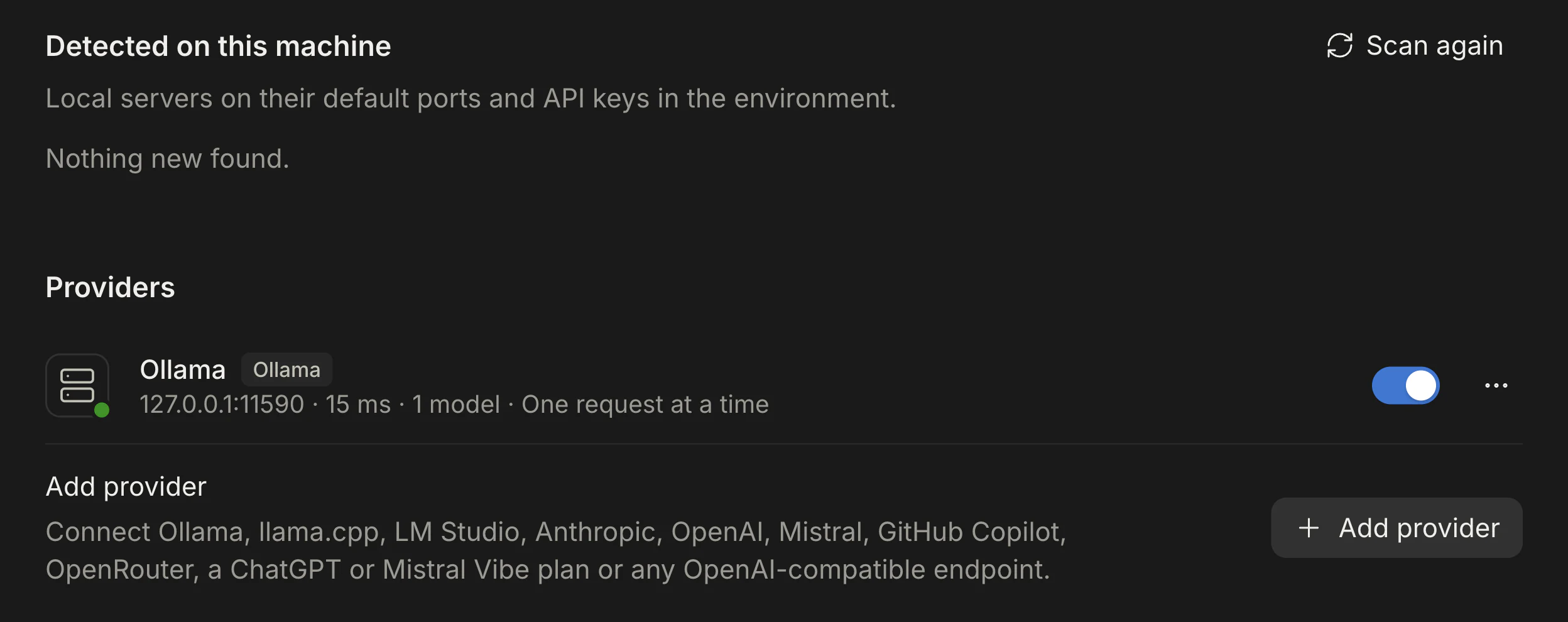
Atelier checks every enabled provider when it starts and whenever you add, edit, enable or disable one, and again on Test connection in a provider’s ⋯ menu or Calculate all on the Models page. After you pull a new model on a local server, use one of those to see it.
Add a provider
Section titled “Add a provider”- Open Settings › Admin › Providers. Anything Atelier found on this machine is listed under Detected on this machine with a Set up button (see Detection).
- Choose Add provider and pick one of the choices below.
- Fill in the details, or follow the sign-in step for the sign-in providers.
- Optionally choose Test connection, then Add provider. Saving checks the connection again and lists the models.
| Provider | About |
|---|---|
| Ollama | Models that run on your own machine through Ollama. Free to use; Atelier sizes each model’s context window from your GPU memory. |
| llama.cpp | A llama-server you run yourself, for GGUF models. |
| OpenAI-compatible | Any server that speaks the chat completions API: LM Studio, vLLM, and so on. |
| Anthropic | Anthropic’s models through their API. Needs an API key; priced per token. |
| OpenAI | OpenAI’s GPT models through their API. Needs an API key; priced per token. |
| Mistral | Mistral’s models through its API. Needs an API key from Mistral’s console; priced per token. |
| Mistral Vibe | The models in your Le Chat Pro or Team plan. Paste the key you create for Vibe in Le Chat; uses the plan’s Vibe allowance, no per-token cost. |
| ChatGPT Plan | The models in your ChatGPT plan. Sign in with your account; no per-token cost. Unofficial. |
| GitHub Copilot | The models in your Copilot plan. Sign in with a code from GitHub. Unofficial. |
| ChatGPT Chat | Experimental. ChatGPT itself, driven through a signed-in browser window. Desktop app only. |
| OpenRouter | Hundreds of hosted models, some of them free, through one OpenRouter account. Connect in one click. |
| OpenCode Zen | Hosted models through an OpenCode Console key. |
OpenRouter and OpenCode Zen are not types of their own: they are OpenAI-compatible providers at a fixed address that Atelier sets up for you.
Which provider speaks which API
Section titled “Which provider speaks which API”| Provider | API Atelier uses | Key | Runs | Desktop only | Tool calling | Effort | Images | Notes |
|---|---|---|---|---|---|---|---|---|
| Ollama | Ollama’s native API (/api/chat) |
Optional | Local | No | Native if the model reports tools, else prompted |
The model’s think: levels, or on/off |
If the model reports vision |
Context set on every request; memory budget sizes it |
| llama.cpp | llama-server: chat completions plus /props, /health, /tokenize |
Optional | Local | No | Native if the chat template supports tools, else prompted | The template’s enable_thinking or reasoning_effort |
If /props lists vision |
Needs a tool-capable chat template; reports its slots |
| OpenAI-compatible | Chat completions (/v1/chat/completions) |
Optional | Either | No | Native, or prompted if the server’s metadata lacks tools | reasoning_effort (low, medium, high) where the model advertises reasoning |
If the server’s metadata lists image input | Starts at 32,768 context and no vision unless the server says more |
| Anthropic | Messages | Required | Hosted | No | Native | Adaptive effort (Low to Max), or thinking budgets on 4.5 and older | Yes, and PDFs | List prices built in |
| OpenAI | Responses | Required | Hosted | No | Native | Per model: Low to Extra, Low to High, or none | Yes, for the models Atelier knows | List prices built in; a catalog supplies each model’s limits |
| Mistral, Mistral Vibe | Chat completions (/v1/chat/completions), Mistral’s own variant |
Required | Hosted | No | Native | Per model: levels, an on/off switch, or none | If the model takes images, and then PDFs too | Mistral: list prices built in. Mistral Vibe: uses your plan’s Vibe allowance |
| ChatGPT Plan | Responses, on ChatGPT’s Codex backend | Sign-in | Hosted | No (browser on the desktop, device code on a server) | Native | The levels your account lists | Yes | Unofficial; uses your plan, no per-token price |
| ChatGPT Chat | None: drives a signed-in chatgpt.com page in a hidden window | Sign-in | Hosted | Yes | Prompted, always | ChatGPT’s own stops (Instant, Medium, High and, on higher plans, Extra High and Pro) | Images and PDFs | Experimental and fragile; one conversation slot |
| GitHub Copilot | Chat completions, or Responses for models that only take it | Sign-in | Hosted | No (device code) | Native; models without tool calls are left out | The levels each model reports; Copilot Auto uses three tiers | If the model reports vision | Unofficial; uses your Copilot plan |
| OpenRouter | Chat completions | Required, or Connect | Hosted | No | Native; No tools for models OpenRouter lists without tools | Where the model advertises reasoning | From OpenRouter’s metadata | Free models with a daily limit; models hidden until you choose |
| OpenCode Zen | Chat completions | Required | Hosted | No | As OpenAI-compatible | As OpenAI-compatible | As OpenAI-compatible | Its free models may only work inside OpenCode |
“Optional” keys are sent as a bearer token only when you enter one. Every model also gets the Low to Max effort scale; where the provider’s own setting cannot express a level, Atelier asks the model for it in a short note (see Effort). The exceptions are ChatGPT Chat, whose stops replace the scale, and Ultracode, which only Code offers.
How current this is
Section titled “How current this is”The model list and what each model can do (tools, images, reasoning, and the context length where the provider says) are read from the provider while Atelier runs, so they don’t go stale here. What can lag behind a change on the provider’s side:
- How the table above describes each API. It changes when a provider changes its API; Atelier’s adapter changes with it in a release.
- The list prices built in for Anthropic, OpenAI and Mistral, and OpenAI’s catalog of model limits. Settings › Usage › Prices overrides a price.
- The unofficial integrations (ChatGPT Plan, ChatGPT Chat, GitHub Copilot) can stop working whenever the service changes, without notice.
How each provider is tested, against the live service or recorded responses, and when the live checks last ran, is in What is tested live.
Ollama
Section titled “Ollama”- Base URL:
http://localhost:11434by default. A trailing/v1that you paste is dropped. - Key: optional.
- What Atelier asks:
/api/versionfor health,/api/tagsand/api/showfor the model list and what each model can do,/api/chatfor replies, and/api/psto tell “loading the model” from “reading the conversation”. - Memory budget: a field for the GB of video memory available, which sizes each model’s context automatically. See Local models.
Everything specific to Ollama (the think setting, loading messages, the grammar fallback) is on
Local models.
llama.cpp
Section titled “llama.cpp”- Base URL:
http://localhost:8080by default. - Key: optional.
- What Atelier asks:
/health,/props(context size, vision, chat template),/v1/models,/v1/chat/completionsand/tokenizefor token counts. In router mode (when/modelslists models with a load status) it lists every model and reads details only for the ones that are loaded, so asking never makes the server load one. - Tools: the model’s chat template has to support tools. When
/propsreports a template without tool support, Atelier uses prompted tools for that model. When the server only fails once a request carries tools, you get the message under Provider errors, and you can switch the model to prompted tools.
OpenAI-compatible
Section titled “OpenAI-compatible”Use this for LM Studio, vLLM, a gateway, or any server that offers /v1/chat/completions and /v1/models. A llama.cpp
llama-server also offers them, but the llama.cpp provider reads more from it; use that one.
- Base URL:
http://localhost:1234/v1by default (LM Studio’s port). Give the address of your server, with or without/v1; Atelier never doubles the version segment. - Key: optional; sent as
Authorization: Bearer …. - Models: from
/v1/models. Ids that look like embedding, speech (whisper,tts), transcription, DALL-E, moderation or reranking models are left out. Image, video and audio models have providers of their own: see Image generation, Video generation and Audio generation. - What Atelier reads from the model list when the server provides it:
context_length,max_model_len,context_window,max_context_lengthortop_provider.context_length; image input; the supported parameters (tools,reasoning). A plain server such as LM Studio usually reports none of these, so a model starts at a 32,768 token context, with tools assumed native and vision off. - What to do about that: open Settings › Admin › Models, then ⋯ › Edit overrides… to set the real context length and mark vision as supported, or use Probe tool calling to check tools. See Models.
- Detection: only LM Studio’s default,
http://localhost:1234/v1, is detected, as “LM Studio”. - Queue: an address on this computer or your local network counts as one GPU (one request at a time); a public address counts as a hosted API (16 requests at once). Set Requests at once if that is wrong for your server.
Anthropic
Section titled “Anthropic”- Base URL:
https://api.anthropic.com. Key: required (sent asx-api-key, withanthropic-version: 2023-06-01). - Models:
/v1/modelsreports each model’s context window, output limit, image and PDF input and effort levels; Atelier uses those, and a built-in catalog for ids that report nothing. A model that is in neither gets 200,000 tokens of context and 32,000 of output. - Thinking: current models use adaptive thinking with the chosen effort level (clamped to the levels the model lists). Models up to 4.5 use a thinking budget instead: 4,000, 10,000, 20,000, 32,000 and 48,000 tokens from Low to Max, never more than the reply’s output limit allows.
- Sampling: a temperature you set is sent only when thinking is off and the model accepts it (4.6 and older). Newer models reject it, so Atelier never sends it.
- Caching: prompts are cached (up to four cache breakpoints), and cache reads and writes are priced separately.
- Cost: see Cost.
OpenAI
Section titled “OpenAI”- Base URL:
https://api.openai.com. Key: required. - API: the Responses API, stateless (
store: false); reasoning items come back encrypted and are replayed with the calls they preceded. - Models:
/v1/modelshas no capability data, so Atelier keeps a catalog by id (context window, output limit, vision, PDFs, effort levels) and lists only chat models (gpt-…,o3-style andchatgpt-…ids, without audio, realtime, transcription, speech, image, search, embedding, instruct, moderation and computer-use variants). A model missing from the catalog gets a 128,000 token context, 16,384 tokens of output, no vision and no reasoning control; fix it with an override. - Sampling: a temperature is sent only for known models without reasoning, which reject it.
- Cost: see Cost.
ChatGPT Plan
Section titled “ChatGPT Plan”The models in your ChatGPT plan, signed in the way OpenAI’s Codex signs in, so usage counts against your plan instead of per-token billing. It is not ChatGPT Chat; ChatGPT compares the two and assesses the risks.
- Desktop app: Add provider › ChatGPT Plan › Sign in with ChatGPT opens your browser; Atelier receives the sign-in on
localhost:1455and the provider is added when it finishes. The browser sign-in times out after 5 minutes. - Server: the same button shows a one-time code and a link to OpenAI’s verification page. Enter the code within 15 minutes. Everyone who can use the provider uses the admin’s plan.
ChatGPT Chat
Section titled “ChatGPT Chat”An experimental second way to use a ChatGPT plan: Atelier drives the chatgpt.com page in a browser window you sign in to once. It exists only in the desktop app, is fragile by nature, and may conflict with OpenAI’s terms. Read ChatGPT before you add it.
Your own models on a server
Section titled “Your own models on a server”On a server, everyone can add the model servers on their own computer and their own ChatGPT Chat in Settings › Your models, from the desktop app on that computer. They are not providers for everyone: only that person sees and uses them, while the app there is connected. See Local models.
GitHub Copilot
Section titled “GitHub Copilot”Signs in with your GitHub account instead of a key, and lists the models in your Copilot plan.
- Add provider › GitHub Copilot › Sign in with GitHub shows a short code.
- Open github.com/login/device (the dialog links it), enter the code and approve.
- The provider is added and the models appear in the picker.
It works in the desktop app and on a server, because the sign-in needs no redirect back to Atelier. On a server everyone who can use the provider uses the admin’s plan, so add it only where that is allowed. It needs an active Copilot subscription on that GitHub account.
- Which models: the ones your plan’s model picker offers that take tool calls and are not disabled by your plan’s policy. Models only reachable through Anthropic’s message format are left out. Context is the model’s window, capped by its prompt limit.
- Copilot Auto: a model named Copilot Auto asks Copilot’s router to choose the model for each conversation. On plans whose model picker holds only Auto (Free and Student) it is listed first, followed by the models their policy enables; on other plans it is listed last. Low, Medium and High effort are the router’s Efficiency, Balance and Intelligence tiers, and Extra and Max also ask for Intelligence. If the router cannot be reached, the plan’s fallback model answers, and the router is tried again after five minutes. Auto has not been verified against a Free or Student account.
- Your messages and the agent’s: your own messages count as yours with Copilot; tool steps, sub-agents and titles count as the agent’s.
- Limits: Copilot’s own allowance applies. Atelier cannot show how much is left; the context popover in Code shows your token use instead.
Mistral
Section titled “Mistral”Mistral’s models through its API, priced per token. Mistral and Mistral Vibe are the same adapter; they differ only in the key and in how use is paid.
- Base URL:
https://api.mistral.ai. For processing in the EU only, change it tohttps://api.eu.mistral.ai. Mistral charges 1.1 times its prices there, and not every model or feature is offered there. - Key: required, from Mistral’s console (console.mistral.ai/api-keys; the form’s Open Mistral’s console button opens it). Mistral’s free plan also gives a key, with low limits, after a phone check; Mistral may train on what is sent with it.
- What Atelier asks:
/v1/modelsfor the model list and health,/v1/chat/completionsfor replies. Mistral refuses fields it doesn’t know, so requests carry only Mistral’s own. - Models: one entry per model. Mistral lists a model under each of its names (
mistral-small-latestas well asmistral-small-2603); Atelier folds them into the model. Retired models and models that can’t chat are left out, and context is the window Mistral’s list gives. Atelier knows the names, output limits and reasoning of Mistral Large 4, Mistral Medium 3.5 (which Mistral lists asmistral-medium-latest), Mistral Small 4, Mistral Large 3, Ministral 3 14B, 8B and 3B, Codestral, GLM 5.3, GLM 5.3 Flash and GLM 5.2 (hosted by Mistral), DeepSeek V4.1 Flash and Voxtral Small. Mistral has deprecated Medium 3.5 (retiring on 30 April 2027) and Large 3. A model Atelier doesn’t know still works with what Mistral’s list says about it; if it reasons, it gets High only. - Effort: levels on Large 4 (Low, Medium, High), GLM 5.3 and GLM 5.3 Flash (Low, High, Max), GLM 5.2 (Low, Medium, High, Max) and DeepSeek V4.1 Flash (Low, High, Max; with no level it reasons by itself); a Thinking switch on Medium 3.5 and Small 4. An effort a model doesn’t take goes as the nearest lower one it does (Medium as Low on GLM). See Effort.
- Output limit: Mistral counts reasoning toward a reply’s output limit, so a turn on a model that reasons may use the model’s whole limit (131,072 tokens, 262,144 on Large 4), within the room the context has left. A reply that reaches it is continued; none of the tool calls in it runs, also when Mistral ends it as an ordinary tool call, as it does for GLM.
- Thinking: streamed and shown, and sent back with the reply on later turns, as Mistral asks.
- Tools: native, or prompted for a model Mistral lists without function calling. Call ids from another provider, in a conversation that switched to Mistral, are mapped to the nine-letter ids Mistral takes.
- Images and PDFs: up to 8 images a request, 10 MB and 10,000 pixels a side each; more are left out with a note to the model. Models that take images get PDFs as documents, which Mistral reads itself; other models get the PDF’s text.
- Caching: Mistral caches prompts on its own. Atelier sends the conversation’s id as
prompt_cache_key, so its requests are more likely to reuse the cache. - Sampling: a temperature you set is sent, at most 1.5 (Mistral’s maximum).
- Cost: see Cost.
Mistral Vibe
Section titled “Mistral Vibe”The models in a Le Chat Pro or Team plan, through Mistral’s API with the key the plan gives for Vibe. Use is counted against the plan’s Vibe allowance instead of being priced per token. Everything else is as for Mistral.
- In Le Chat, open Code › Vibe CLI (chat.mistral.ai/code/extensions; the form’s Open Vibe keys in Le Chat button opens it) and create a key.
- Add provider › Mistral Vibe, paste the key, and Add provider.
Atelier doesn’t use Vibe’s own sign-in: you create the key and paste it.
- Models: the ones Mistral lists for the key. Vibe’s own models are listed as the models they are:
mistral-vibe-cli-latestis Medium 3.5,mistral-vibe-cli-fastis Small 4. - Past the allowance requests wait for the next billing period, unless pay-as-you-go is on in Mistral’s console; then they are charged. A refused request ends the turn with “Name usage limit reached: … The plan’s Vibe allowance starts again at the next billing period, or turn on pay-as-you-go in Mistral’s console.”
- The allowance in the app (admins only): the context ring’s popover in Chat and Code shows Plan usage limits · plan with a Monthly allowance bar and when it resets, and “Pay-as-you-go is on: use past the allowance is charged.” when it is. From 90% a line above the message box warns (“You’ve used 93% of your Mistral Vibe monthly allowance.”); at 100% it reads “You’ve reached your Mistral Vibe monthly allowance.”, or with pay-as-you-go “…: more is charged as pay-as-you-go.” The Usage tool reports it to the model. Atelier reads it from Mistral’s billing API, the endpoint Vibe itself reads, which Mistral doesn’t document, and keeps a reading for 30 seconds. Where the key may not read it, the popover says “Mistral doesn’t report this plan’s allowance to this key.”
- On a server everyone who can use the provider spends the admin’s plan, and Mistral’s terms don’t allow passing a key to others. Add it only where that is allowed.
- Cost: no per-token price. An admin can still set one in Settings › Usage.
OpenRouter
Section titled “OpenRouter”Add provider › OpenRouter gives you two ways to supply a key:
- Connect with OpenRouter opens OpenRouter in your browser. Sign in and allow Atelier; OpenRouter creates a key, and Atelier stores it encrypted and adds the provider. Nothing is pasted. The wait ends after ten minutes.
- Or paste a key from openrouter.ai/keys into the API key field.
In the desktop app the browser comes back to the app on your computer. If you decline access, the form says “OpenRouter didn’t connect: access was declined.” On a server the browser comes back to the server’s own address, so finish in the same browser you started in, signed in to Atelier as yourself. Declining there shows the message in the browser page, and the form keeps waiting until you close the dialog or the ten minutes pass (“Connecting timed out. Start it again.”). If OpenRouter refuses the connection, the form shows “OpenRouter refused the connection (status…).”
- Base URL:
https://openrouter.ai/api/v1. - Free models: models whose id ends in
:free, or that OpenRouter prices at zero, are marked Free on the Models page and “free” in the picker. They cost nothing but are limited to 50 requests a day (1,000 once you have bought at least 10 credits). - No tools: models OpenRouter lists without tool calling are marked No tools, because OpenRouter routes a request with tools only to endpoints that take them.
- Hidden by default: OpenRouter lists hundreds of models, so none appear in the picker until you choose. Open Settings › Admin › Models, switch to Browse catalog under OpenRouter, and turn on Visible for the ones you want. A model you favorite, add by id, or use as a default or an alias is shown without that.
- Attribution: requests carry OpenRouter’s app headers (
HTTP-Referer: https://atelierhq.dev,X-Title: Atelier), so the traffic shows as Atelier in your OpenRouter activity.
OpenCode Zen
Section titled “OpenCode Zen”Add provider › OpenCode Zen takes a key from the OpenCode Console (opencode.ai), where billing may be required. Its free models may only work inside OpenCode itself.
- Chat address:
https://opencode.ai/inference/openai/v1. The model list is read fromhttps://opencode.ai/inference/v1/models. - Models are listed and shown like any other OpenAI-compatible provider; nothing is hidden by default.
The form
Section titled “The form”Providers with a form (everything except the three sign-in providers) share these fields.
| Field | What it does |
|---|---|
| Name | What you see in lists and the picker. Renaming also renames the ID until you edit the ID yourself. |
| ID | Lowercase letters, digits and dashes, starting with a letter or digit, at most 48. Models are referenced as id/model-name in defaults, aliases, prices and sessions, so it cannot be changed after the provider exists. A second provider with a taken ID gets -2, -3… |
| Base URL | Must start with http:// or https://. The backend makes the request, so localhost means the computer (or container) the backend runs on, not your browser’s. |
| API key | Required for Anthropic, OpenAI, Mistral, Mistral Vibe, OpenRouter and OpenCode Zen; optional for the rest. See API keys and secrets. |
| Custom headers | Extra request headers, one name and value per row. Names cannot be empty, contain spaces, or repeat. |
| Memory budget | Local servers only: Available VRAM (GB). Used for Ollama only; see Local models. |
| Requests at once | 1 to 64, or empty for automatic. How many requests Atelier sends the server at the same time. |
| Models at once | 1 to 16, or empty for automatic. How many different models the server keeps loaded at once. |
The two limits are what the server’s GPU can take: Atelier queues the rest. Automatic means what the server reports (llama.cpp reports its slots), else one of each for a server on this computer or your network, else 16 requests and no model limit for a hosted API. Details are in Sharing a GPU.
Custom header values are stored in the settings file as you type them. To keep a token out of it, add the token under
Settings › Admin › Keys & secrets and enter ${secret:its-id} as the header value.
API keys and secrets
Section titled “API keys and secrets”When you save a provider with a key, Atelier stores the key in its secret store and keeps only a reference
(${secret:provider-<id>}) in the provider’s settings.
- Encrypted at rest. On the desktop the secret store is encrypted with the operating system’s secure storage; on a server
it uses AES-256-GCM with
ATELIER_SECRET_KEYor a key file readable only by the server. See Security and Self-hosting. - Never shown again. Only the last characters appear (“Key ••••3f9a” on the provider row). Replace lets you type a new key; leaving the field alone keeps the stored one.
- Detected keys (
ANTHROPIC_API_KEY,OPENAI_API_KEYin the backend’s environment) appear as “From $NAME”. Saving copies the value into the secret store; it does not stay linked to the environment. Enter a key swaps to typing one. - Keys & secrets: Settings › Admin › Keys & secrets lists every stored secret with its masked value, what uses it
(for example “Provider Anthropic”), and when it was created, last used and rotated. Rotate replaces the value everywhere it
is used, from the next connection on. Delete is refused while something uses the secret (“Used by Provider X. Remove that
first.”). Add secret stores a key or token you can reference as
${secret:id}in header values and connector settings. - Removing a provider deletes its stored key but not the key at the provider’s side; revoke it there if it should stop working.
Test connection
Section titled “Test connection”Test connection in the dialog (and in a provider’s ⋯ menu) asks the server for its health and its model list. It does not send a message. It gives up on the health check after 6 seconds and on listing models after 15.
On success the dialog reads “Connected · 12 models · 34 ms”, with any warnings under it. On failure it shows the reason:
| Message | Meaning |
|---|---|
| “Nothing is listening at host:port.” | The connection was refused: the server is not running, or the port is wrong. |
| “No answer from host:port within 6 seconds. Check that the server is running and that this computer can reach it (firewall, address, port).” | Nothing answered in time. |
| “Name rejected the credentials (401): …” | The key is wrong or revoked. The text after the colon is the provider’s own. |
| “Name endpoint not found (404) — check the base URL” | The address is not the API’s root. |
| “Cannot reach Name at host” | The request failed before any answer: DNS, TLS or another network error. |
| “Enter the key again to test it. Saving re-checks the connection with the stored key.” | You are editing a provider that needs a key and did not retype it. Save instead, or test from the ⋯ menu. |
| “Could not connect.” with “llama-server is still loading the model” | llama-server answered 503 while it loads. Try again in a moment. |
The form also validates before testing, with a message under the field: a missing name or key (“Name needs an API key.”),
an ID that is malformed or already taken, a URL that doesn’t start with http:// or https://, an empty or repeated
header name, a limit outside 1 to 64 (1 to 16 for Models at once), or a memory budget that isn’t a number above 0.
Detection
Section titled “Detection”Detected on this machine lists what Atelier finds where the backend runs, each with Set up, which opens the form prefilled. Scan again repeats it. It looks for:
| Found | How |
|---|---|
| Ollama | localhost:11434/api/version answers with a version. |
| llama.cpp | localhost:8080/health answers ok, or 503 with an error while loading. |
| LM Studio | localhost:1234/v1/models answers with a model list. |
| Anthropic | ANTHROPIC_API_KEY is set in the backend’s environment and no Anthropic provider exists. |
| OpenAI | OPENAI_API_KEY is set and no OpenAI provider exists. |
Each probe waits 800 ms. Only each server’s own response shape is accepted, since other apps use these ports too. A server you already added at its default address is not listed again. When nothing is found, the section says “Nothing new found.” On a server, “this machine” is the server, not the computer in front of you.
Manage providers
Section titled “Manage providers”Each provider is a row with its name and type, its address (or the signed-in account for the sign-in providers), latency, number of models, for local servers its request limit, and the key’s last characters.
- Status dot: Connected, Connected with warnings, Unreachable (with the error under the name), Not checked yet, or Disabled. Warnings show under the name.
- Switch: turns the provider on or off. Switching re-checks it. A disabled provider keeps its settings and key; its models leave the picker and Settings › Admin › Models, and a conversation that still uses one says “Name is disabled.”
- ⋯ menu: Test connection, Edit (not for the sign-in providers), Remove. ChatGPT Chat’s menu also has Open ChatGPT session and Temporary chats.
- Remove asks first. The provider’s models leave the picker and its stored API key is deleted; chats that used it stay in your history. For ChatGPT Plan and GitHub Copilot it signs you out and deletes the stored sign-in; for ChatGPT Chat it clears the private browser session. Overrides, defaults and aliases that name the provider’s models stay in settings; a default that points at a removed model shows as “no longer available”.
If a provider is unreachable, its models stay in the picker from the last successful listing, and a conversation using one fails with a “Cannot reach…” message until the server is back.
Sharing a GPU
Section titled “Sharing a GPU”Atelier keeps one request queue per model server, and providers at the same address share it. A local server takes one request
and one model at a time unless you or the server say otherwise; a hosted API takes 16 requests and any number of models. An
address counts as local when it is a loopback, link-local or private-network IP address (10.x.x.x, 172.16 to 31.x.x, 192.168.x.x,
100.64.x.x to 100.127.x.x), a bare name without dots (my-gpu-box), or a name ending in .local, .lan, .home, .internal,
.home.arpa, .localhost or .ts.net.
- Short requests you are waiting on (a session’s title, an Auto mode check) go first, then your own replies, then sub-agents, then other background work. Parallel sub-agents take turns.
- Titles, summaries and sub-agents stay on the model that is loaded: a small model on the same server is not used while that server holds only one model, because that would swap models.
- While a request waits, the status row says “Waiting in line for the model · 1 request ahead” (or “Waiting for the model”).
- ChatGPT Chat always has exactly one request at a time.
- Anthropic, OpenAI and Mistral models use the providers’ published list prices, built in (including cache reads and writes, and the long-prompt tier where one applies). Prices were taken from the providers’ pages on 2026-10-15 (Mistral’s on 2026-11-06) and are updated by hand; a model that is not in the table shows no cost rather than a guess.
- Mistral prices cover the models listed under Mistral, under their dated and
-latestnames too. Writing Mistral’s cache costs nothing. The built-in prices are the global ones: onapi.eu.mistral.ai, where Mistral charges 1.1 times them, set your own. - Your own prices win. As an admin, open Settings › Usage, Prices › Add price: choose a model and enter dollars per million tokens for input, output, and optionally cache read and cache write (“As input” when empty). A price counts for requests made after you set it. This is the way to price OpenAI-compatible, OpenRouter, Copilot and local models.
- No price, no cost: every other provider, including ChatGPT Plan and Mistral Vibe, counts tokens only. A subscription’s allowance is the limit, not a price.
- Where you see it: Settings › Usage, and the context ring’s popover shows the session’s cost for Anthropic, OpenAI, Mistral and OpenAI-compatible models that have a price, the plan’s usage windows for ChatGPT Plan, or the monthly allowance for Mistral Vibe.
What is tested live
Section titled “What is tested live”The project tests against real servers for only some providers:
| Provider | How it is tested |
|---|---|
| Ollama | Live: a campaign of the eval suite on a real GPU with seven models (see Local models). |
| Anthropic | Live API. |
| llama.cpp | Recorded responses only. |
| OpenAI | Recorded responses only. |
| OpenAI-compatible, OpenRouter, OpenCode Zen, GitHub Copilot, ChatGPT Plan | Unit tests against recorded or hand-made responses; the optional live checks in the repository can target an OpenAI-compatible endpoint, but they are not part of the regular runs. Copilot Auto has not been tried on a Free or Student account. |
| Mistral, Mistral Vibe | Unit tests against recorded or hand-made responses, and live checks against Mistral’s service (model list, streaming, reasoning, images, tool calls, a reply cut at the output limit, Vibe’s allowance), last run 2026-11-14. With MISTRAL_API_KEY or MISTRAL_VIBE_API_KEY in .env.local (and optionally ATELIER_LIVE_MISTRAL_MODEL, ATELIER_LIVE_MISTRAL_VIBE_MODEL), the live checks stream text and thinking, read an image, call a tool with another provider’s call id and, for Vibe, read the allowance. |
| ChatGPT Chat | Driven against the real chatgpt.com page for formatting, continuing a chat, temporary chats, model and effort selection, and tool calls. A long Code session on it has not been run end to end. |
ChatGPT’s and Copilot’s sign-ins are not documented by their owners as APIs, and Mistral allows Vibe keys in other apps only informally. Treat all three as able to break without notice.
Provider errors
Section titled “Provider errors”Messages a conversation shows when a provider fails. Name is the provider’s name.
| Message | Meaning and what to do |
|---|---|
| “Name rejected the credentials (401)…” | Key revoked or wrong. Replace it in Settings › Admin › Providers › Edit. |
| “Model not found: …” | The provider does not know that model id. Check Settings › Admin › Models. |
| “Name is busy or unavailable (503)…” | Overloaded or rate limited. Atelier retries on its own. |
| “Name usage limit reached: …” | A billing, quota or plan limit (“insufficient quota”, “usage limit reached”, “weekly limit”). The turn ends at once instead of retrying. Rate limits that clear by themselves still retry. For Mistral Vibe the message adds that the allowance starts again at the next billing period, or to turn on pay-as-you-go. |
| “The conversation is too long for this model: …” | The provider refused the request as over its window. Atelier compacts and retries once; raise the model’s context length if it is set too high. |
| “Cannot reach Name at host” | The server is down or unreachable. Retried. |
| “Name at host took too long to respond” / “…sent nothing for too long (no response for 15 minutes)” | A request that receives no bytes for 15 minutes ends. Retried. |
| “Name closed the stream before the response finished” | The connection dropped mid-reply. Retried. |
| “The model’s reply didn’t follow its own format, so Name couldn’t read it (500)…” | A local model wrote a malformed tool call or channel header; asking again usually works. Retried twice. |
| “llama-server cannot render tool calls with its chat template. Start llama-server with –jinja (or a tool-capable –chat-template-file), or switch this model to prompted tools.” | See llama.cpp. |
| “The provider for ref is not configured.” / “Name is disabled.” | The conversation’s model belongs to a provider that was removed or switched off. |
Failures that can clear by themselves retry up to ten times, waiting 5, 10, 15, 30 and 60 seconds, then 2, 4, 8, 16 and 32 minutes; the status row shows the attempt. For anything else, Settings › Admin › Developer can record provider requests (address, status, timing, never prompts or replies); see Troubleshooting.