
Permissions
Every time the model in a Code session or a chat calls a tool (edit a file, run a command, fetch a page, use a connector), Atelier decides what happens: the call runs, you are asked, a separate review request decides, or it is refused. Code shows the prompts; Security puts them in context.
What is covered:
- Code sessions use everything on this page.
- Chats have a permission chip with four of the modes: there is no Plan mode, since a chat has no plan to approve, and an admin default of Plan makes a chat ask instead (as Ask permissions does). In a folder, the mode and the rules below decide. In a chat’s own sandbox, the file and command tools follow fixed rules instead of the mode (Chat). Temporary chats have no chip. See Chat.
The five modes
Section titled “The five modes”The mode picker sits under the message box in Code (in a chat, the chip at the bottom left of the box, without Plan). In Code, with the message box empty, Shift+Tab cycles Auto, Ask, Accept edits and Plan. Bypass and Plan · Auto are only chosen from the menu. A mode change applies at once, also in the middle of a run, and the model is told about it.
| Menu label | Chip | What it does |
|---|---|---|
| Auto mode (the default) | Auto | A separate review request to the session’s own model checks each action that would otherwise ask you, and runs it, asks you, or blocks it with a reason the agent reads. |
| Ask permissions | Ask | Asks before editing files or running commands. |
| Accept edits | Accept edits | Edits files without asking; still asks before commands. |
| Plan mode | Plan | Reads and plans only. Changes wait until you approve a plan. |
| Bypass permissions | Bypass | Never asks, not even for risky commands. Deny rules and ask rules still apply. |
A session follows the default mode until you pick one. Settings › Admin › Code › Default permission mode sets it (Auto unless changed).
What happens when
Section titled “What happens when”“Runs” means no prompt. “Asks” means you get the permission prompt. “Review” means that in Auto mode the reviewing model decides first (it runs the action, blocks it, or hands the decision to you).
| The model wants to | Auto | Ask | Accept edits | Plan | Bypass |
|---|---|---|---|---|---|
| Read, Glob or Grep inside the folder | Runs | Runs | Runs | Runs | Runs |
| Read, Glob or Grep elsewhere on the machine | Runs; paths that look like credentials: Review | Asks | Asks | Asks | Runs |
| Write or Edit a file in the folder | Runs; protected files: Review | Asks | Runs | Refused | Runs |
| Write or Edit a file elsewhere | Review | Asks | Asks | Refused | Runs |
| Run a command with Bash | Review | Asks | Asks | Refused | Runs |
Run a dangerous command (force push, sudo, curl … | sh …) |
Review | Asks, with a warning | Asks, with a warning | Refused | Runs |
Delete outside the folder (rm -rf ~/projects) |
Asks | Asks, with a warning | Asks, with a warning | Refused | Runs |
| Use a connector’s tool | Review | Asks | Asks | Refused; asks if the connector calls the tool read-only | Runs |
| Send a message to another session, stop a background task | Review | Asks | Asks | Refused | Runs |
| WebSearch, WebFetch, Skill, Agent, BashOutput, ListSessions, Time, Usage | Runs | Runs | Runs | Runs | Runs |
| TodoWrite, AskUser, ExitPlanMode, show an artifact | Runs | Runs | Runs | Runs | Runs |
| Move the session to another folder (ChangeDirectory) | Asks | Asks | Asks | Asks | Asks |
| Add an MCP server it was given to your connectors (AddConnector) | Asks | Asks | Asks | Asks | Asks |
| Use apps on your computer (computer use: ComputerAccess); an app you named yourself in the conversation never asks | Asks | Asks | Asks | Asks | Runs |
| Take over the mouse and keyboard (computer use: FullControl) | Asks | Asks | Asks | Asks | Asks |
| Look at the screen: screenshots, scrolling, the app list (computer use) | Runs | Runs | Runs | Screenshots run; scrolling refused | Runs |
| Click, type, press keys, open apps (ComputerAction, OpenApp) | Review | Asks | Asks | Refused | Runs |
| Anything a deny rule matches | Refused | Refused | Refused | Refused | Refused |
| Anything an ask rule matches | Asks; a dangerous command: Review | Asks | Asks | Asks (only what Plan lets through) | Asks |
| Anything an allow rule matches | Runs, except dangerous or unreadable commands, and broad rules are ignored | Runs, with the same exceptions | Runs, with the same exceptions | Refused if it changes anything | Runs |
Plan mode refuses every Bash command, git status included. Dangerous commands are covered under Dangerous commands, and paths outside the folder under Outside the folder.
The decision order
Section titled “The decision order”For one tool call the engine checks these in order and stops at the first that decides. Hooks and the Auto reviewer come after it.
- Deny rules. A match refuses the call in every mode, Bypass included. For Bash, every command in the line is checked.
- Plan mode. Anything that is not read-only (and not TodoWrite, AskUser, ExitPlanMode, artifact, ChangeDirectory, AddConnector, ComputerAccess or FullControl) is refused.
- Ask rules. A match asks you, in every mode. In Auto it asks you, not the reviewer, except for a command on the dangerous list, which the reviewer decides.
- Commands that can’t be judged from their text (command substitution,
eval, and the rest of the list under How commands are read) ask, or go to the reviewer in Auto, even when an allow rule matches. Bypass skips this step. - Allow rules. A match runs the call. For Bash, every command in the line must be allowed on its own. A dangerous command still asks (or goes to the reviewer) even then. In Auto mode, broad allow rules are set aside first.
- Bypass runs everything left.
- Auto only: clearing build output and temp files runs without review (routine cleanup).
- ChangeDirectory, AddConnector, ComputerAccess and FullControl ask for themselves, each with its own card (ComputerAccess not for an app you named yourself, nor in Bypass). A computer use step that only looks (screenshots, scrolling, waiting) runs; clicks, typing, keys and opening apps continue below like any other action (Computer use).
- Files outside the folder. Read-only tools run in Auto (credential-looking paths go to the reviewer); everything else asks, or goes to the reviewer in Auto. In Ask and Accept edits, allowing one look at a file allows looking at that folder for the rest of the session (credential files still ask), so reading or moving a whole project is one approval. Changes ask per call, like edits in the workspace. On a server, paths are read the way the folder’s own computer writes them, so a Windows PC’s folder works from a Linux server.
- Read-only tools and the session tools (TodoWrite, AskUser, ExitPlanMode, artifact) run.
- Accept edits runs file edits. Auto runs file edits too, except protected files, which go to the reviewer.
- Everything else asks, or goes to the reviewer in Auto.
Then, for a call that was not refused:
- PreToolUse hooks run. A hook can block the call, ask, approve it or rewrite its input; a rewritten call goes through the rules again. See Hooks.
- A call that “goes to the reviewer” is judged by the reviewing model. If it can’t decide or isn’t allowed to, you get the prompt.
Deny is checked first and across all rule layers, so no layer can undo another’s deny: a project can’t loosen what you or your admin blocked.
A rule is Tool or Tool(specifier), in Claude Code’s syntax. Atelier reads three lists, allow, ask and deny, from several places and applies them together.
| Rule | Matches |
|---|---|
Bash |
Every command. |
Bash(npm test) |
Exactly npm test. |
Bash(npm test *) |
npm test and npm test --watch, but not npm testing. The space before * keeps a word boundary. |
Bash(git status:*) |
The older prefix form: any command that starts with git status. |
Read(./.env) |
Read, Glob and Grep calls whose path is that file. |
Read(~/.ssh/**) |
Anything under ~/.ssh. |
Edit(/docs/**) |
Write and Edit calls under docs/ in the project. |
Edit(//etc/hosts) |
The absolute path /etc/hosts. |
WebFetch(domain:example.com) |
example.com and its subdomains. |
Agent(reviewer) |
The sub-agent type reviewer. |
Skill(pdf) |
The skill pdf (also plugin:pdf). |
mcp__github |
Every tool of the connector github. |
mcp__github__create_issue |
One tool of that connector. |
mcp__github__* |
Every tool of that connector, as the plain name does. |
Tool names are case-sensitive and start with a capital letter. Read covers Read, Glob and Grep; Edit covers Write and Edit; Agent also covers its older name Task. The rule fields in Settings refuse a name such as bash(ls) and a WebFetch(…) rule whose text doesn’t start with domain:.
Bash allow rules match each simple command on its own, never the whole line: Bash(npm test *) approves npm test but not npm test && rm -rf ~, because the rm needs a rule of its own. Deny and ask rules are tested against every command in the line and against the line as a whole, so a Bash(rm *) deny rule also stops echo done && rm x.
Paths follow gitignore-style rules, anchored like this:
| Starts with | Relative to |
|---|---|
// |
The filesystem root (//etc/hosts; on Windows //C:/Users/me/x). |
~/ |
Your home folder. |
/ |
The project, which is the session’s folder. |
./ or a bare name |
The session’s folder. A bare name with no slash (.env) matches that name at any depth below it. |
* matches within one folder level, ** any number of levels, ? one character. A plain folder pattern with no wildcard covers everything inside it. On Windows, backslashes work in patterns and C:\x and C:/x are the same file.
Where rules come from
Section titled “Where rules come from”All of these apply at once.
| Layer | Where you change it | Lists |
|---|---|---|
| Admin | Settings › Admin › Code: Allow rules, Ask rules, Deny rules | allow, ask, deny |
| Project, shared | .atelier/settings.json in the folder, under permissions |
allow, ask, deny |
| Project, yours | .atelier/settings.local.json (Always allow in this project writes here) |
allow, ask, deny |
| Claude Code’s project files | .claude/settings.json and .claude/settings.local.json, while Claude Code compatibility is on (Settings › Admin › Code, on by default) |
allow, ask, deny |
| Claude Code’s user file | ~/.claude/settings.json, in the desktop app, for folders on this computer, with compatibility on |
allow, ask, deny |
| You | Settings › Code › Always-allowed actions | allow |
| This session | Allow for this session in a prompt | allow |
A project’s file looks like this:
{ "permissions": { "allow": ["Bash(npm test *)", "Bash(git status *)", "Edit(/docs/**)"], "ask": ["Bash(git push *)"], "deny": ["Read(./.env)", "Bash(rm *)"] }}Project files are read through the folder’s own machine, so rules in a repository on an SSH host or in a codespace are read there, and changes apply within a few seconds. A file that isn’t valid JSON adds nothing. Atelier keeps .atelier/settings.local.json out of git by adding it to .git/info/exclude, never to your .gitignore.
The admin lists, the default mode and the additional directories live under permissions in Atelier’s settings file (~/.atelier/settings.json on the desktop, /data/settings.json on a server), with the keys defaultMode (auto, default, acceptEdits, plan or bypassPermissions), allow, ask, deny and additionalDirectories.
Connector tools use the same rules: in Settings › Admin › Connectors a tool’s Always allow, Ask and Block are allow, ask and deny rules on mcp__server__tool. They ask until a rule says otherwise. See Connectors.
The prompt and “Always allow”
Section titled “The prompt and “Always allow””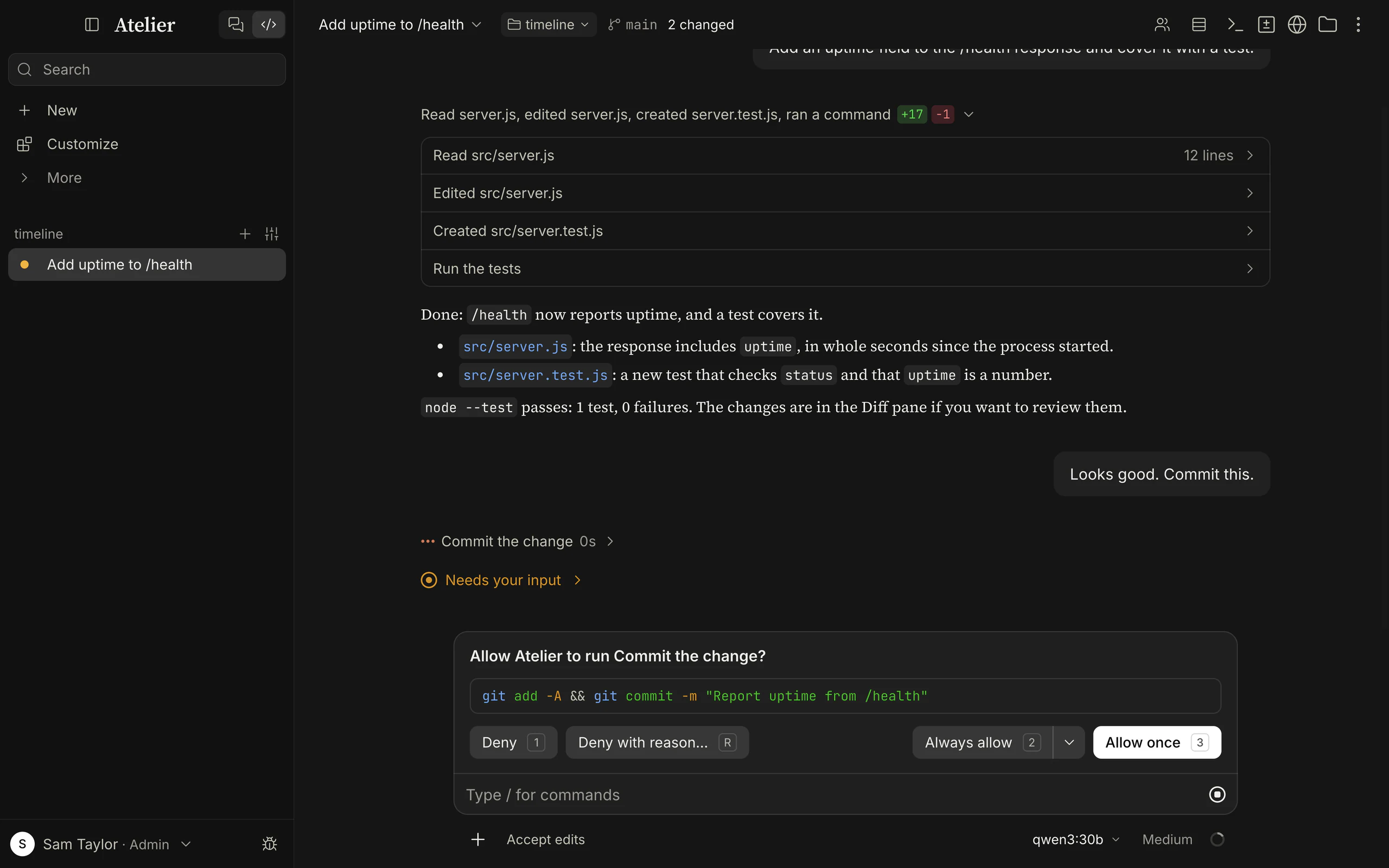
A permission prompt is titled Allow Atelier to run …? (or to edit, write or use something); for a sub-agent, Allow sub-agent “name” to run this command?. It shows the command, a diff or the call’s arguments, and why it asks.
| Button | Keys | What it does |
|---|---|---|
| Deny | 1, Esc |
Refuses. The model reads that you declined and is told not to retry the same action unchanged. The reply goes on: it can take another route or ask you. |
| Deny with reason… | R |
Opens a field. Say why or what to do instead, and Enter sends it: the model reads your words as the result of the call and goes on from there. Esc puts the field away. |
| Always allow | 2, ⇧⌘↵ |
Allows and remembers it in this project. In a chat without a folder, for you everywhere. |
| Allow once | 3, ⌘↵ |
Allows this call only. With no Always allow (a dangerous command), it is 2. |
The chevron next to Always allow offers Allow for this session, Always allow in this project and Always allow everywhere; the last two show the rule they add. Everywhere means your Always-allowed actions. On Windows and Linux, Ctrl replaces ⌘ and Shift replaces ⇧.
The cards that ask for themselves (moving to another folder, adding a connector, using apps on your computer) have Say why… beside their refusal, which works the same way. A plan’s card has Revise… for this.
Where the change lands. An Edit’s diff shows the file’s own line numbers as they are when you are asked, with old and new side by side once they differ, so they match what your editor shows. When an edit changes several places (replace_all), the card says how many and shows the first. Where the file can’t be read, the diff shows without numbers: a file outside the folder stays unread until you allow the call.
The whole file. Show the whole file, the button at the top right of an Edit’s or Write’s card (or F), opens the file with the change in place, scrolled to it, read as it is at that moment. A new file shows as new, and a Write over a file shows what changes in it. Deny, Deny with reason…, Always allow and Allow once are there too, with the same keys, except that Esc only leaves the view. Up to 5,000 lines show; a longer file keeps the part around the change and says how many lines it left out. Files that can’t be shown (binary, over 16 MiB, or changed so that the edit no longer applies) say so and show the diff.
Explain each change. With Settings › Code › Permissions › Explain each change on, the model gives a short reason for each edit, and the card shows it under the title. It is off by default: every Edit and Write then costs a few more tokens, in every mode, also when no card shows. A session keeps what it started with, so turning it on applies to new sessions. The reviewer in Auto mode doesn’t see the reason: it judges what the edit does.
The rule Atelier suggests:
| For | The rule |
|---|---|
| A command | Bash(git status *) for git, npm, pnpm, yarn, bun, cargo, go, docker, kubectl, gh, make, uv, pip and brew with a subcommand; otherwise Bash(ls *) for the first word. |
| An edit | Edit(/src/components/**): the file’s folder in the project and everything below it; Edit(/*) for a file at the root. |
| A page | WebFetch(domain:example.com) |
| A sub-agent or a skill | Agent(type), Skill(name) |
| A connector tool | mcp__server__tool |
| A read or an edit outside the project | A rule for the file’s folder: Edit(//home/me/notes/**), or Read(//tmp/skill/**) for Read, Glob and Grep (for Glob and Grep, the folder they searched). |
| Any other tool | Its name. |
A dangerous command can’t be remembered. Its prompt has a red warning and only Deny and Allow once; the same command asks again next time. Allowing something once or for the session clears Auto mode’s pause (below).
How commands are read
Section titled “How commands are read”A Bash command line can hide several commands. Atelier splits it before checking rules, so a deny rule applies wherever the command sits:
- Commands joined with
&&,||,;,|,&and newlines are checked one by one, as are those inside$(…), backquotes and<(…), behindif,then,do,(…),{ …; }or!, and in function bodies. - What a command runs itself is checked:
find … -exec,xargs,sh -c,env -S,watch,busybox,sudo,doas, and wrappers such astime,timeoutandnohup. - Quoting tricks are undone first:
r''m,"rm",\rm,$'\x72m'and{rm,-rf,build}are allrm …;/bin/rmisrm;FOO=1 rm …isrm …;git -c core.sshCommand=… pushisgit push. - Variables set earlier on the line are filled in (
x=rm; $x -rf build), and a script piped into a shell is read (echo 'rm -rf build' | sh).
When a deny rule stops a call, the model is told not to get the same result another way, with a different command or tool, and to tell you what was blocked.
For allow rules the reading is stricter:
- Every command in the line must be allowed by a rule of its own.
- Wrappers that only change how a command runs (
time,nice,nohup,timeout,command,exec,stdbuf,ionice,setsid) are looked through:Bash(npm test *)allowstime npm test. - Programs that hand something to another program (
find -exec,xargs,sh -c,env -S,sudo,doas) need an allow rule for the inner command too: allowingfinddoesn’t allow what its-execruns. FOO=1 npm testneeds the whole part allowed, since a variable can change what a command does.
Commands that can’t be judged from their text are never approved by an allow rule. They ask (or go to the reviewer in Auto) unless the mode is Bypass: command and process substitution, eval, source and ., case statements, function definitions, GNU parallel, a command whose name comes from a variable, a shell reading commands from its input, and quotes, escapes or braces that can’t be read reliably.
Dangerous commands
Section titled “Dangerous commands”These are flagged in every mode except Bypass, and the flag overrides an allow rule:
| Command | Why it is flagged |
|---|---|
sudo, doas |
Runs as root. |
rm with -r, -R or --recursive on something outside the folder (the folder itself counts as outside) |
Recursively deletes outside the workspace. |
find … -delete or -exec rm starting outside the folder |
Deletes files outside the workspace. |
git push with --force, -f, --force-with-lease or a +refspec |
Rewrites remote history. |
git reset --hard |
Discards uncommitted changes. |
git clean -f |
Deletes untracked files. |
chmod -R 777 |
Makes files world-writable. |
dd of=/dev/… |
Writes directly to a device. |
shutdown, reboot, halt, poweroff |
Restarts the machine. |
mkfs, mkfs.* |
Formats a filesystem. |
curl, wget or fetch piped into sh, bash, zsh, dash, fish, python, node, perl or ruby |
Runs a download straight away. |
| A fork bomb | Obvious. |
What a flag does depends on the mode:
- Ask, Accept edits: the prompt carries a red warning and is approved one call at a time.
- Auto: the reviewer decides. Deleting outside the folder asks you, because nothing can undo it; deleting below a temp folder (
/tmp,/var/folders, the system temp folder) is ordinary scratch work, though never the folder itself or a glob. - Bypass: no flag, no prompt. A deny rule still refuses it, and an ask rule still asks.
The list is a safety net for common slips, not a complete list of harmful commands.
Auto mode
Section titled “Auto mode”Auto mode is the default. Its aim is fewer prompts: instead of asking you about each command, a separate request to the session’s own model reads the action and decides.
What runs unreviewed in Auto
Section titled “What runs unreviewed in Auto”- Reads, searches and edits inside the folder (except protected files) and reads elsewhere on the machine (except credential-looking paths).
- Clearing generated or temporary files:
rm(andcd) of folders namednode_modules,dist,build,out,.next,.nuxt,.svelte-kit,.turbo,.cache,.parcel-cache,.vite,.output,target,__pycache__,.pytest_cache,.mypy_cache,.ruff_cache,.venv,venv,coverage,.nyc_output,.gradle,tmp,temp,test-results,playwright-report, and.DS_Storefiles, in the folder, and anything below a temp folder. No globs, no variables, nothing else on the line. - Commands covered by a narrow allow rule. These broad rules are ignored while Auto is on, because they would run any code unreviewed:
Bash,Bash(*), an interpreter (Bash(python3 *),node,ruby,perl,php,bash,sh,zsh,deno,bun,npx,pnpx,bunx,uv run) or a script runner (npm run,pnpm run,yarn run,bun run), andAgent.Bash(npm test)is fine.
What goes to the reviewer
Section titled “What goes to the reviewer”- Bash commands not covered by an allow rule, and connector tools.
- Edits outside the folder.
- Edits to protected paths: the folders
.git,.vscode,.idea,.husky,.cargo,.devcontainer,.yarn,.mvn,.claudeand.atelier, and files such as.gitconfig,.gitmodules, shell startup files (.bashrc,.zshrc,.profileand the like),.envrc,.npmrc,.yarnrc,.pnpmfile.cjs,bunfig.toml,.pre-commit-config.yaml,lefthook.yml,.devcontainer.json,.mcp.jsonand.claude.json. They change how git, shells, editors or the agent itself behave. Only Auto sends them to review: Accept edits runs an edit to one like any other edit in the folder. - Reads outside the folder that look like credentials or private data:
.ssh,.aws,.gnupg,.kube,.azure,.password-store, cloud andghconfig,.netrc,.git-credentials,.npmrc,.envfiles, private keys and key stores (id_rsa,*.pem,*.key,*.p12,*.kdbx…), keychains, browser and password-manager data,/etc/shadowand sudoers,~/.claude.json, and Atelier’s own data folder and settings. Inside the folder this check does not apply: a.envfile there is read like any other file in it, in every mode. - Dangerous commands and commands that can’t be judged from their text.
What always asks you
Section titled “What always asks you”Even in Auto, these skip the reviewer and ask you: ask rules (except on a dangerous command), deleting outside the folder, the ChangeDirectory, AddConnector and computer use cards, and a hook that answers ask.
What the reviewer sees and decides
Section titled “What the reviewer sees and decides”The reviewer is a model call of its own. It gets:
- your last 10 messages (each cut at 2,000 characters), which are its only source of intent;
- the agent’s last 30 actions without their results (lookups such as Read, Glob and Grep are left out), each cut at 400 characters;
- the pending action (cut at 8,000 characters), the folder, and why the engine sent it for review; for a sub-agent, its task and its own actions.
It never sees tool output. A hostile file, web page or command result can’t talk to it. Text inside actions and file contents is data to it.
It answers ALLOW, ASK or BLOCK. Its instructions are published on Side prompts; in short, it blocks the following unless you asked for exactly that:
- downloading and running code, or packages from outside the project’s manifests;
- sending secrets anywhere, or reading credential stores;
- force pushes,
git reset --hard,git clean -fdand other commands that discard uncommitted work; - deleting your own pre-existing work beyond what you asked for (clearing build output and caches is fine);
- changes to system locations, other applications’ data, deploys and releases, shared databases, CI and cloud settings;
- changing where pushes go, or turning off a guard such as
--no-verify; - starting other agents or loops that run without review;
- anything you said not to do.
It allows reading and searching, building, testing and formatting, edits for the task, installing the dependencies a project declares, read-only network requests, and committing and pushing to the project’s own branch when the task calls for it.
What each answer does:
- ALLOW runs the action.
- ASK brings up the usual prompt, with the line Auto mode wants your OK: and what you should decide. It is for an action that looks like what you want but your messages don’t settle. It does not count against the agent.
- BLOCK doesn’t run the action. The agent reads Auto mode blocked this action: with the reason, plus an instruction to take a safer approach or tell you what it needs rather than reach the same result another way.
With a hosted model (the providers Anthropic, OpenAI, Mistral, Mistral Vibe, ChatGPT Plan and GitHub Copilot) the reviewer reads “asked for” broadly: an action your request clearly leads to, such as pushing the branch you are working on or shipping what you asked to ship, counts as asked for. Local models (Ollama, llama.cpp, LM Studio) and every provider added as OpenAI-compatible, OpenRouter and OpenCode Zen included, keep the stricter reading, because small models judge less reliably.
Which model reviews
Section titled “Which model reviews”The session’s own model, so a one-model local server never has to swap models; a sub-agent’s actions are reviewed by that sub-agent’s model. Every review is an extra request to that model: up to 400 tokens of answer, counted against your account or plan limits. On a busy local server a review jumps ahead in the queue and waits at most 90 seconds there and 10 minutes overall.
A session on ChatGPT Chat can’t review its own actions, because a review would take the conversation’s single slot. The Small model (Settings › Admin › Models) reviews instead; without one, or when that is ChatGPT Chat too, you are asked: Auto mode has no other model than ChatGPT Chat to check this action. Set a small model in Settings › Admin › Models, or pick another permission mode.
When it stops and asks you
Section titled “When it stops and asks you”Auto mode fails closed: whenever it can’t be sure, you get the prompt, never a silent allow.
- The reviewer can’t be reached or errors: Auto mode couldn’t check this action (…).
- Its answer isn’t
ALLOW,ASKorBLOCK: Auto mode couldn’t read its reviewer’s answer. - 3 blocks in a row, or 20 in the session: Auto mode paused after 3 blocked actions in a row. From then on every action that would have gone to the reviewer asks you instead. Approving any prompt resumes Auto mode and resets both counts.
A block counts against the top-level conversation, sub-agents included.
What Auto mode is not
Section titled “What Auto mode is not”- It is not a security boundary. The reviewer is a model: it can be wrong in both directions, and a small local model more often than a large hosted one.
- It does not confine commands. An allowed command runs as you, on your machine or the SSH host, with your files, network and credentials.
- It reads text. A harmful command whose text doesn’t show it can pass; a harmless one can be blocked.
- A narrow allow rule skips it. Rules you add, or that a project brings, run without review.
- It reduces prompts. For work on sensitive systems, use Ask permissions, add deny rules, or work in a throwaway folder.
Plan mode
Section titled “Plan mode”Plan mode lets the model investigate without changing anything. The model can read, search, use the web tools and start sub-agents (which are in plan mode too); edits and every Bash command are refused with Plan mode is on, so this can’t run yet. …
Plan mode in the mode picker opens a side menu with two ways:
- Manual (the chip reads Plan): what plan mode lets through and would ask about, such as reading a file outside the folder, asks you, as described above.
- Auto (the chip reads Plan · Auto): the Auto mode reviewer answers in your place. Reading anywhere goes ahead (credentials and keys still go to the reviewer), and a Bash command runs if the reviewer finds it only looks, for example
git logorls, and changes nothing. Allow rules never let a command through here, a command already found dangerous is refused, and edits stay refused until you approve the plan.
A server from before this version offers only Plan. An admin can make Plan · Auto the default in Settings › Admin › Code › Default permission mode.
While the model writes its plan, its step in the conversation reads Writing plan… and shows what has come in so far; it reads Waiting for approval once the approval card is up.
When the model understands the task it calls ExitPlanMode with a Markdown plan (up to 20,000 characters). That shows Atelier proposed a plan above the message box and opens the Plan pane, where you can read it and select any passage to Comment.
| Choice | Result |
|---|---|
| Accept and auto mode | Leaves plan mode for Auto. |
| Accept | Leaves plan mode for Ask: every edit asks first. |
| Chevron › Accept and auto-accept edits | Leaves plan mode for Accept edits: edits go ahead, other actions still ask. |
| Chevron › Accept and approve each edit | Same as Accept. |
| Revise… | Opens a field for what should change. Your comments on the plan go with it. The model revises and presents again. |
| Reject | The model stays in plan mode and asks what to change. |
After you accept, the session’s mode is the one you chose and the model is told to start implementing and keep the task list current. A plan presented while plan mode is off needs no approval: the model reads Plan mode is off, so this plan needs no approval: go ahead with the work.
Outside the folder
Section titled “Outside the folder”The file tools (Read, Write, Edit, Glob, Grep) work inside the session’s folder (the git repository’s top level, when the folder you chose is inside one). The runner that carries them out refuses any other path. When a call is allowed outside the folder, by you, a rule or Auto mode, Atelier opens the nearest existing folder for the runner so the call can go through; it never opens /, your home folder or the folder that holds it.
Settings › Admin › Code › Additional directories names folders that count as part of the workspace for permission decisions. Use absolute paths such as /srv/shared or C:\Shared. The runner is told it may use them too. Bash isn’t confined to the folder at all: commands run as you and can read what you can read, which is why Auto mode and the dangerous-command list pay attention to what a command does.
Hooks in Claude Code’s format run commands at points of a session. For permissions the point is PreToolUse, which runs after deny rules and before the prompt:
- Exit code 2 blocks the call. Its stderr is the reason, and the model reads A PreToolUse hook blocked this call: ….
- JSON output can answer allow, ask or deny, and can rewrite the call’s input. A rewritten call goes through the rules again.
- allow skips the prompt and the Auto reviewer. It does not skip deny rules, an ask rule, Plan mode, or the flag on a dangerous command.
- ask brings up the prompt, with the line A PreToolUse hook asks for your approval., even in Auto mode.
Hooks come from Settings › Admin › Code › Hooks, from a project’s .atelier or .claude settings and from plugins. Atelier runs command hooks for PreToolUse, PostToolUse, UserPromptSubmit, SessionStart and Stop. See Hooks and plugins.
Sub-agents, side chats and loops
Section titled “Sub-agents, side chats and loops”- Sub-agents start with the session’s mode and rules, and every call they make goes through them. Their prompts show up in the parent’s transcript. A sub-agent in Plan mode stays in it and cannot ask you questions or leave it.
- Side chats (
/btw) follow the main session’s mode and rules, ask in their own pane, and have only read-only tools. - Loops send ordinary messages: they ask for permission like any other message, never approve anything themselves, and the next send waits for your answer. See Loops and background tasks.
When something is refused
Section titled “When something is refused”| Message the model reads | What it means |
|---|---|
Blocked by the rule Bash(rm *). … The person’s settings rule this out |
A deny rule matched. The model is told not to reach the same result another way. |
| Plan mode is on, so this can’t run yet. | Plan mode refused a change. |
| Auto mode blocked this action: … | The reviewer said no. |
| A PreToolUse hook blocked this call: … | A hook blocked it. |
| The person declined this action. Do not retry it unchanged; ask them or take another approach. | You pressed Deny. |
If a rule refuses something you want, the message names it; find it in Settings › Admin › Code, in the folder’s .atelier/settings.json or .claude/settings.json, or in ~/.claude/settings.json.